Student Information
This page gathers everything you'll need now that we're working together: how to book and cancel lessons, how billing works, what to send me before class, and where to find your notes afterward. If you can't find what you're looking for here, just email me at

Booking & Scheduling
All scheduling happens in the student portal. You can book, cancel, and see your upcoming lessons there at any time, and you can browse my next 90 days of availability before you log in to find a time that works.
Lessons can be booked as little as 12 hours in advance. That said, if your own schedule is tight, I'd recommend booking about three weeks ahead so you can count on getting the times you want.
How do I cancel a lesson?
First, login above to access the parent/student portal. Then, follow the steps below.
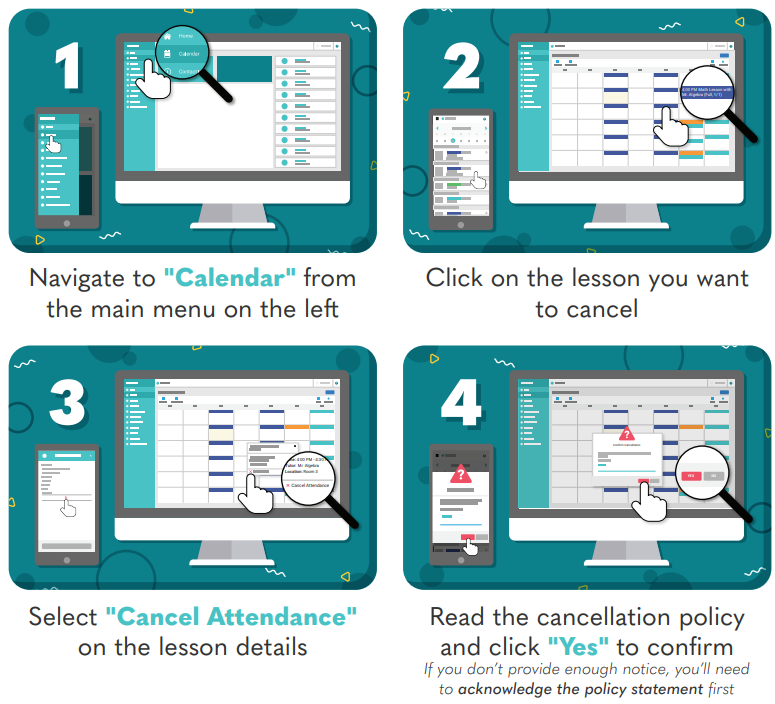
Please note that students whose parent/guardian(s) haven't granted them calendar booking permissions will not be able to sign up for or cancel lessons on the calendar. This setting can be changed on the parent/guardian-side profile settings.
If in a pinch, you can also email me at
Can I set up a weekly recurring lesson time?
Yes, and this is the easiest way to lock in a time that works for you. Email me at
How do I sign up for lesson reminders?
For both students and parents, lesson reminders are available 24 hours in advance of class by email and/or 2 hours in advance of class by text. After logging in,
- click your name at the top-right of the screen,
- click My Preferences,
- click the pencil icon to edit student and/or parent contact information,
- make sure the listed email address and mobile numbers are up to date,
- if SMS reminders are desired, make sure the "SMS Capable" box is checked under the mobile number,
- and finally in the "Reminders" section check the types of lesson reminders you would like to receive.
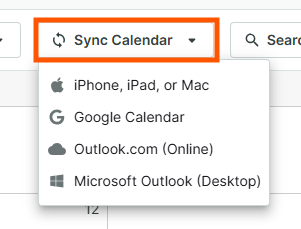
How can I synchronize my class calendar with my calendar, such as Google Calendar or iCal?
After logging in,
- Navigate to Calendar from the main menu on the left.
- Click Sync Calendar in the toolbar.
- Select your device/calendar from the drop-down menu.
Please note that due to limitations set by Google, you will only see updates to your synced calendar once every 24 hours on Google Calendar.
What time zone does the calendar show?
Everything is shown in your own local time, so there's no conversion to do on your end. Just make sure your time zone settings in the student portal match that of your current location.
Policies
Please note that I hold a strict 24-hour cancellation policy (click for details)
- The online registration system will not accept cancellations once the 24 hour window has passed.
- Late-cancelled lessons (cancellations less than 24 hours in advance) are still billable.
- Registrations can be made for classes up to 12 hours before a class start time. Please note that registrations made within 12-24 hours before a class start time cannot be cancelled online. If you make a registration in error when registering less than 24 hours in advance, email me immediately at
or text me. - If you would like to make a reservation on shorter than 12 hours notice, please email me at
or text me to confirm availability. I cannot guarantee that my listed availability online is accurate with less than 12 hours notice, but I can make work what is possible. - Email reminders for appointments are automatically sent 36 hours in advance and SMS reminders (when opted-in) are sent 2 hours in advance.
- Please make sure your contact information on your account is up-to-date and that notifications are on if you would like to receive reminders.
No-shows and late cancellations are truly my least favorite situations to encounter in the online teaching business, but it's a necessity in order for me to be able to keep teaching as a reliable and sustainable occupation, which is fundamentally what allows me to be able to provide teaching opportunities in the first place. 😊 Let's please work together to try to avoid late cancellation situations in the first place and we all will remain happy.
How long are lessons, and can I change my default length?
Most students take 60-minute lessons, but you can request whatever length works best for you (45, 60, 75, 90 minutes, and so on). Email me at
What are your rates, and are there discounts?
Current rates are listed in the pricing FAQ on my homepage. Two ways to bring the cost down:
- Package discounts for buying 10, 20, or 40 lessons at once.
- Referral discount when you refer a new student to me.
Billing & Payments
In most cases, lessons are billed at my lesson rate on the first of each month for the lessons that took place during the previous month. Invoices are sent out automatically by email, and billing information is visible in the student portal to parents and adult students.
Available payment options are shown below. Please note that as of August 2025, online payments carry a 2.89% processing fee to offset credit card processing costs.
| 1 | st |
| Payment method | Send to… | Processing fee |
|---|---|---|
| Zelle (preferred) | none | |
| Online payment (credit card, Venmo, auto pay, etc.) | Pay online by logging in or using the link in your emailed invoice. | 2.89% |
| Paper check via mail | none |
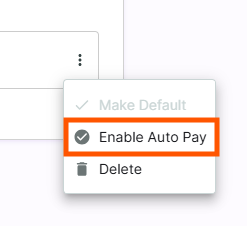
How do I enroll in automatic payments?
After logging in,
- click your name at the top-right of the screen,
- click My Preferences,
- click Manage Payment Methods, and finally
- select Enable Auto Pay in the dropdown for the card that you would like to make automatic payments with.
What if I need more time to pay?
If you anticipate any payment delays or need to set up a payment plan, please just reply to your invoice email or write to me at
Before & During Class
Classes are held on Zoom. Your lesson reminder email arrives 36 hours before class and contains the Zoom link.
What should I do to prepare for my lesson?
One of the greatest challenges for me in tutoring is being prepared to teach content that is relevant and specifically tailored to the needs of your teacher and your class. I teach many students from many districts each week, and the needs of two different students can vary greatly. The more we can stay in communication about your class content, the more effective our sessions will be.
Please send me the following before our class session begins:
- A quick note about what topics you'd like to cover, or what you've been working on in class recently.
- Any changes to your personal achievement goals.
- Any documents or files that would be useful for us to look over together: exam study topic lists, worksheets, homework, textbook pages, review guides, and so on. When possible, please send original PDF files, as these are easier for me to work with during class than images.
Photos taken with your phone are perfectly fine. Please avoid sending links unless they are publicly viewable (you can check this by opening the link in an incognito window).
Email to
Can I record our lessons?
Yes! Click the record button in Zoom during a lesson to begin recording. The video file is saved to your own computer at the end of the meeting, for your personal use.
Are progress reports available?
Yes. Progress reports are available on request for parents of youth students taking at least two lessons per month, up to one report per month. Email me at
What should I have ready for class?
A quiet space, a reliable internet connection, and a way to show me your written work (a phone camera, a tablet, or simply holding your paper up to the webcam all work). I'll share a digital whiteboard during class, so you don't need any special software beyond Zoom.
After Class
Where can I find my class notes?
Notes and materials from our tutoring sessions live on the My Class Notes page. Head there and enter your first and last name to open your personal folder.
Do you assign homework?
Homework assignments are available by request. I typically offer them at no additional charge, but so that my time goes to the students who will get the most out of them, I generally don't create homework assignments unless a student or parent asks for them explicitly.
Students are often very busy, so additional tutor-assigned homework isn't always appropriate. If it would be helpful, just let me know roughly how much time you can reasonably devote between classes and I'll put something together.
Need Help?
I can't log in and haven't taken classes in over a year.
Accounts that have been inactive for over a year may be archived, so your login will stop working. Just email me at
Something else isn't working.
Email me at